
Picture a Friday night at a 35-room independent hotel. Two guests show up at once, the front desk agent is on the phone with an OTA about a rate mismatch, and the night audit still needs to run before anyone can go home. This is the moment a lot of hoteliers start asking a simple question: is there a better way to run this property? That’s usually when the term “cloud hotel PMS” starts showing up in their search history.
A cloud hotel PMS is property management software that runs online instead of on a server sitting in a back office. Reservations, guest records, housekeeping status, and daily operations all live in one system that staff can reach from a browser, on any device, from anywhere. This article walks through what a cloud PMS actually does, why it matters for hotels of different sizes, what to look for when comparing options, and how a platform like Phoenix Booking Portal fits into that picture.
What a Hotel PMS Actually Does
A property management system is the operational backbone of a hotel. At a basic level, it’s the software that tracks who’s staying in which room, when they’re arriving and leaving, and what they owe. But in practice, a hotel PMS system touches nearly every department.
Depending on the setup, a PMS can handle:
- Reservation management and room inventory
- Guest check-in and check-out
- Rate and availability updates
- Housekeeping status and room turnover
- Basic accounting tasks like night audit
- Reporting on occupancy, revenue, and operations
For many independent hotels, these tasks used to live in separate tools — a spreadsheet for reservations, a whiteboard for housekeeping, a notebook for maintenance requests. That works for a while, but it tends to break down as occupancy grows or as a property starts pulling reservations from multiple channels.
Why “Cloud-Based” Matters
The word “cloud” gets used loosely in hotel technology marketing, so it’s worth being specific about what it actually changes for day-to-day operations.
A traditional, on-premise PMS typically runs on a physical server at the property. Updates have to be installed manually, access is usually limited to computers on-site, and if that server goes down, staff can lose access to reservation data until it’s fixed. A cloud-based hotel PMS, by contrast, is hosted online. Staff log in through a web browser, updates happen on the provider’s side, and the system can generally be reached from a laptop, tablet, or phone as long as there’s an internet connection.
This distinction matters most in a few situations:
- Multi-property management — Owners or managers overseeing more than one property can check occupancy or reservations without being physically present at each hotel.
- Remote or after-hours management — A general manager can review the day’s arrivals from home instead of calling the front desk.
- Staff mobility — Housekeeping or maintenance staff can update room status from a hallway instead of walking back to a front desk terminal.
Cloud-based hotel management software doesn’t eliminate operational work, but it does reduce how much of that work is tied to a single physical location or device.
Common Problems Hotels Run Into Without a Centralized System
Before looking at what a cloud PMS can do, it helps to name the problems it’s usually solving. A common challenge for hotels running on disconnected tools is that information exists in multiple places that don’t talk to each other. A reservation might get entered in a booking spreadsheet, but the front desk log and the housekeeping board don’t automatically reflect it.
This creates a few recurring headaches:
- Overbookings — If availability isn’t updated across every channel in real time, two guests can end up booked into the same room.
- Slow check-in — Front desk staff spend time hunting for guest details across different tools instead of pulling up one record.
- Housekeeping delays — Rooms get marked “dirty” or “clean” inconsistently, so staff don’t always know which rooms are ready.
- Manual night audits — Reconciling the day’s transactions by hand takes time and leaves room for error.
Imagine a 40-room independent hotel that currently manages reservations using a spreadsheet, tracks housekeeping on a paper checklist, and checks OTA extranets separately throughout the day. Each of those steps works on its own, but stitching them together eats into staff time that could go toward guest service instead.
What to Look for in a Cloud Hotel PMS
Not every hotel needs the same feature set, but there are a few categories worth evaluating when comparing cloud-based hotel PMS software.
| Capability | Manual Process | Basic PMS | Cloud PMS |
|---|---|---|---|
| Reservation Management | Manual, spreadsheet-based | Available | Centralized, real-time |
| Guest Check-In / Check-Out | Manual | Available | Available |
| Housekeeping | Separate process, paper-based | Limited/Available | Available |
| OTA Management | Manual, per-channel | Depends on system | Supported |
| Night Audit | Manual | Available | Automated |
| Remote Access | Limited | Depends on system | Cloud-based |
When comparing options, it’s worth evaluating:
- Core PMS functions — reservations, check-in/out, and rate management should be straightforward to use.
- OTA and channel connections — the system should help keep availability consistent across booking channels.
- Operational modules — housekeeping and maintenance tracking matter as much as the reservation side.
- Accessibility — cloud-based access means staff aren’t tied to one terminal.
- Support — hotel operations run around the clock, so ongoing assistance matters, especially during the first few months of use.
How Phoenix Booking Portal Helps Hotels
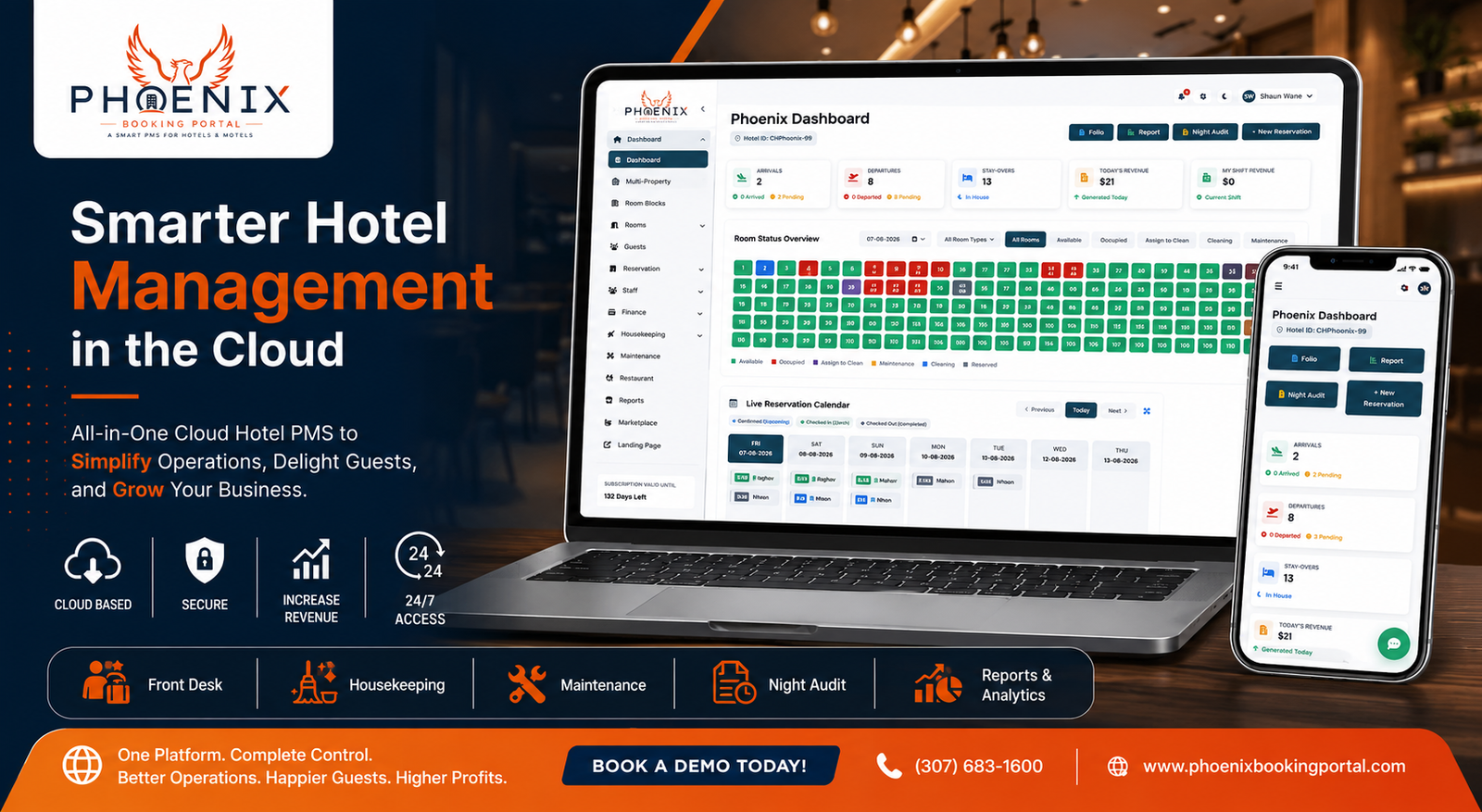
For hotels evaluating a move away from spreadsheets and disconnected tools, Phoenix Booking Portal is one example of a cloud-based hotel management platform built around bringing these operational pieces into one system.
At its core, Phoenix Booking Portal is a cloud-based hotel PMS, meaning hotel teams can access reservations and operational data from a browser rather than being limited to a single on-site computer. This matters for smaller hotels where the general manager might be handling several roles and needs to check on the property without physically being at the front desk.
On the reservations side, the platform includes guest check-in and check-out functionality designed to help front desk staff move guests through arrival and departure more efficiently, and it supports OTA platform integration so availability updates can be managed from a more centralized point rather than logging into each channel separately. That centralization is particularly relevant for hotels dealing with the kind of overbooking risk described earlier — when reservation data lives in one place, there’s less room for the kind of mismatch that happens when channels update independently of each other.
Beyond the front desk, Phoenix Booking Portal includes a housekeeping module to help organize room status and cleaning tasks, and an automated night audit feature intended to reduce the manual work involved in closing out each day’s transactions. For hotels running food and beverage operations, there’s also a restaurant module, and a clock in/clock out module for tracking staff attendance.
None of these tools eliminate the need for good operational judgment — a PMS is a tool, not a replacement for trained staff. But for a hotel currently juggling a spreadsheet, a paper housekeeping log, and separate OTA extranets, consolidating those workflows into one cloud-based hotel management platform can cut down on the back-and-forth that eats into a day.
Implementation: How Hotels Typically Move to a Cloud PMS
Switching PMS systems can feel like a big undertaking, but it’s usually more manageable when broken into stages.
- Identify the operational problems first. Is the biggest pain point reservations, housekeeping coordination, OTA management, or something else? This shapes which features matter most.
- Review current workflows. Map out how reservations, check-in, housekeeping, and accounting currently happen, including where information tends to get lost or duplicated.
- List required features. Not every hotel needs every module — an independent boutique property has different needs than a hotel with a full-service restaurant.
- Compare cloud-based options. Look at how each system handles the specific workflows identified in step two, not just the marketing feature list.
- Check integrations. Confirm the system connects with the OTAs and channels the hotel currently relies on.
- Train staff before going live. A centralized PMS only helps if the team actually uses it consistently.
- Monitor adoption after launch. Check in with staff after the first few weeks to see what’s working and what still feels clunky.
A centralized PMS can reduce repetitive manual work by bringing related hotel processes into one system, but the transition itself takes some planning. Hotels that treat implementation as a step-by-step process, rather than a single flip of a switch, tend to have a smoother rollout.
Quick Answers: Cloud Hotel PMS
Q: What is a cloud hotel PMS?
A: A cloud hotel PMS is property management software hosted online rather than on an on-site server. It lets hotel staff manage reservations, guests, and daily operations through a web browser from any internet-connected device, instead of being limited to one computer at the property.
Q: Is a cloud PMS better than a traditional on-premise system?
A: It depends on the hotel’s needs, but cloud systems generally offer more flexibility since they don’t require on-site hardware and can be accessed remotely. Traditional systems may still suit hotels with limited internet reliability or specific infrastructure requirements.
Q: Can a cloud hotel PMS manage OTA reservations?
A: Yes, most cloud hotel PMS platforms, including Phoenix Booking Portal, support OTA integration so hotels can manage availability and reservations from multiple channels in a more centralized way, reducing the risk of overbooking.
Q: How long does it take to switch to a cloud PMS?
A: Timelines vary by property size and complexity, but implementation typically involves reviewing current workflows, migrating data, configuring the system, and training staff. Smaller independent hotels often move through this process faster than larger multi-department properties.
Q: Do small independent hotels need a cloud PMS?
A: Not every small hotel needs every feature a PMS offers, but even independent properties running 20-50 rooms can benefit from centralizing reservations, housekeeping, and OTA management, especially once manual processes start creating scheduling conflicts.
Frequently Asked Questions
Q: What is a hotel PMS?
A: A hotel PMS, or property management system, is software used to manage a hotel’s core operations, including reservations, guest check-in and check-out, room inventory, and often housekeeping or accounting tasks. It acts as the central system that hotel staff use to run daily operations, replacing manual logs or disconnected spreadsheets.
Q: What does a cloud hotel PMS do differently from a traditional PMS?
A: A cloud hotel PMS is hosted online instead of on a local server, meaning staff can access it from any device with internet access rather than being tied to one on-site computer. This also means software updates and maintenance are typically handled by the provider rather than hotel IT staff.
Q: Why should hotels consider cloud-based PMS software?
A: Cloud-based hotel PMS software offers accessibility that on-premise systems typically can’t, letting managers and staff check reservations or operations remotely. It can also reduce the burden of maintaining physical servers and manual updates, since those responsibilities generally shift to the software provider.
Q: Can a hotel PMS integrate with OTA platforms?
A: Many cloud hotel PMS systems, including Phoenix Booking Portal, support OTA platform integration. This helps hotels manage availability and reservations across multiple booking channels from a more centralized system, which can reduce the manual work involved in updating each channel separately.
Q: What features should hotels look for in PMS software?
A: Hotels should evaluate reservation management, guest check-in/check-out, housekeeping coordination, OTA integration, and accounting features like night audit. Beyond features, it’s worth considering how accessible the system is, what support is available, and whether it fits the hotel’s specific size and operational needs.
Choosing a System That Fits Your Hotel
There isn’t a single “right” PMS for every property — a boutique hotel with 20 rooms has different needs than a 150-room full-service hotel with a restaurant and banquet space. What matters most is identifying where the current process is breaking down, whether that’s overbookings, slow check-ins, or housekeeping coordination, and finding a system that addresses those specific gaps.
If your hotel is still relying on disconnected tools to manage reservations, guests, housekeeping, and daily operations, a centralized cloud PMS may be worth considering. Phoenix Booking Portal brings several of these functions — reservations, OTA management, housekeeping, and automated night audit among them — into one cloud-based platform, giving hotel teams a more centralized way to manage their day-to-day workflows. Explore Phoenix Booking Portal to see how the platform is structured, or request a demo to walk through how it could fit your property’s specific setup.


Leave a Reply